Getting Started with the API
The INFO-Subscription APIs are HTTP-based and designed to somewhat conform to the REST ideology. Purists will note that there are no Hypermedia links.
The entire management capability of the platform is exposed in the API, meaning that whatever you see in our supplied management and self-service solution you should be able to do with the API. Meaning you can do things such as:
Integrate with existing web-shops or frontends
Provide tailored self-service for subscribers matching your brand and workflows
Integrate management capability in a custom business portal, CRM System or similar
Important
Please read the introduction about the terminology before you start banging your head against the wall, it might actually contain a pointer or two that will help you.
In order to actually use the API you will need a couple of things
A set of client credentials
A TenantId
The client credentials are used for authentication and authorization to the API which is described separately
While the TenantId is used to ascertain which tenant your application is trying to access.
Once you have authenticated, try retrieving a subscriber or all subscriptions to get some instant gratification.
Obtaining Client Credentials
At the current time there is no registration process, so you have to contact Infosoft to obtain a set of credentials.
Client Credentials comes in the form of a client_id and client_secret are used to authenticate (identify) and authorize an application in the API.
Together with the S4-TenantId (see below), the API will determine if the client should be granted access or not.
Important
The client_secret is actually secret. You should keep this safe, and not disclose it to others.
Tip
You should consider obtaining separate credentials for separate applications/solutions.
This way it is easier for you to keep track of the source when investigating issues, errors or peculiar behaviour.
Obtaining a Tenant Id
Infosoft should have given you a Tenant Id when you signed up for using INFO-Subscription. If you are a third party, contact the tenant/customer and have them provide you with a Tenant Id. If not please contact support for the Tenant Id
Using the Tenant Id
The TenantId is in the form of a UUIDv4/GUID such as fe923cfe-2e67-4f7a-960a-d4c36fce22c4 and at the current time is required in the S4-TenantId header for all requests to the API.
Endpoint(s)
The INFO-Subscription APIs are accessed using https://api.info-subscription.com/ as the base url. All paths, names etc that is referenced here will be relative to that base URL.
Building Requests
In general requests are build such that a HTTP Method/Verb corresponds to a specific type of action.
GETRequests data from a resource.POSTCreates a resource or starts a business process. Such as completing an order that in turn creates Subscriptions and Invoices.PUTReplaces/Completely Updates an existing resource.DELETEDeletes a resource or cancels a business process. Such as cancelling an order to make sure it can no longer be completed.PATCHPartially updates a resource or state of a process
The APIs expect JSON as input and outputs JSON unless otherwise noted in the reference documentation.
Tip
Even though the APIs Accept application/json as input and responds with application/json by default, it is recommended that you set the Accept and Content-Type headers
so there is no doubt for client and server what is requested.
If for some reason you really really like XML, Protobuf, Thrift, MessagePack or your own custom content type, then let us know and we might consider implementing it.
Handling Responses
Just as requests are build around the common HTTP Methods, the API responses are constructed around common HTTP Status Codes. Each response contains a code and optionally a body. We strive to follow the same convention throughout the API which should hopefully provide consumers a streamlined experience. Let us know if you discover inconsistencies! We really appreciate it.
Successful Responses
For successful requests we generally map the status codes as follows:
GETReturnsHTTP 200 OKwith a body.POST(i.e. create a new resource) ReturnsHTTP 201 Created(optionally with a body) orHTTP 202 Accepted. In most cases there is also a location in the response header.PUTReturnsHTTP 204 No Contentwith no bodyDELETEReturnsHTTP 204 No Contentwith no body
You can consider this as a general rule, but to be certain please refer to the reference docs for your particular action.
Asynchronous Processing
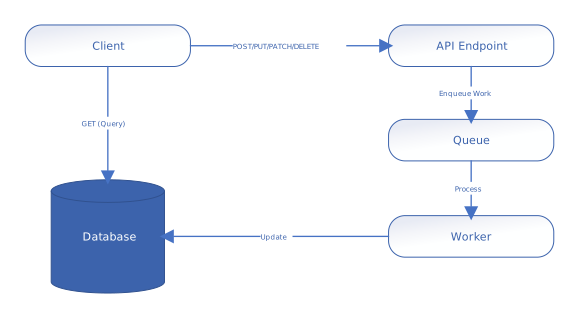
INFO-Subscription use asynchronous processing to provide a responsive and scalable experience.
This means that when you make a request to create or modify a resource, or to start a workflow (such as with POST, PUT, PATCH, or DELETE), the API does not always complete the work immediately while you wait.
Instead, it quickly validates your input and offloads the actual work to a background processing system. This approach allows the platform to handle large workloads efficiently and ensures that your requests are not blocked by long-running operations.
The typical flow for asynchronous operations is as follows:
Input Validation: The API first checks that your request is well-formed and meets all requirements. If there are issues, you receive a client error (see below).
Offloading to Processing Queue: If validation succeeds, the API submits your request to a background processing queue. This queue is continuously processed by worker services that perform the actual work (such as creating resources, updating data, or running business logic).
Immediate Response with ``Location``: The API responds, often with a
HTTP 202 Acceptedstatus and aLocationheader. TheLocationheader provides a URL (usually a query endpoint) where you can check the status or result of your request.
Note
For most query endpoints (GET), results are retrieved directly from the database and are typically synchronous.
Polling for Results
Since the work is done in the background, you may need to check the status of your request. This is done by polling the URL provided in the Location header.
The recommended approach is to use incremental back-off polling: start with a short interval between requests, and increase the interval if the result is not yet ready.
This helps avoid unnecessary load on the system, while still providing fast interactive responses in most cases.
Depending on your use case, a fixed interval may be sufficient, but be prepared to adjust if you encounter frequent retries or delays.
Visual Overview
The following diagram illustrates the asynchronous processing flow:
Error Conditions
There are two categories of errors.
Errors that the client can do something about, typically input format or unmet requirements. These produces status codes in the 400-499 range.
Errors that is entirely the fault of the server, typically environment errors or implementation errors or other similar unexpected conditions. These produces status codes in the 500-599 range.
Client Errors
As described above these are Errors that the client should handle, typically by displaying some sort of feedback to the user.
Typically client errors are validation/format related and generates a HTTP 400 Bad Request response with a validation error instance.
Problem Details (RFC 9457)
Newer endpoints are adopting the standardized Problem Details for HTTP APIs (RFC 9457) format for reporting client validation errors. This format provides a consistent and machine-readable way to convey error information, including fields such as type, title, status, detail, and instance. Some endpoints may return both the legacy validation error format and Problem Details, depending on the specific API version or resource.
When interacting with newer endpoints, you may receive a response similar to the following:
{
    "type": "https://api.info-subscription.com/errors/validation",
    "title": "One or more validation errors occurred.",
    "status": 400,
    "detail": "See the errors property for details.",
    "instance": "/orders/12345",
    "errors": {
        "Currency": ["The Currency field is required."],
        "ValueDate": ["Date is out of Range"],
        "PaidAmount": ["The amount is out of Range"],
        "PaymentDate": ["Date is out of Range"]
    }
}
Important: - Always check the response body for either the legacy validation error format or the Problem Details format. - Some endpoints may use both formats for a transitional period.
Whenever possible multiple validations will be included in a single response, but since some validations are dependant on existence of a given resource this is not always achievable.
The following is an example of a BadRequest response with multiple validation failures.
HTTP/1.1 400 Bad Request
Transfer-Encoding: chunked
Content-Type: application/json; charset=utf-8
Server: Kestrel
Request-Context: appId=cid-v1:ae92dc8e-a862-4e47-92f2-cc707892f433
X-Powered-By: ASP.NET
Date: Mon, 01 Jan 2042 00:13:37 GMT
{
    "message": "Validation Failed",
    "errors": [
        {
            "field": "Currency",
            "message": "The Currency field is required."
        },
        {
            "field": "ValueDate",
            "message": "Date is out of Range"
        },
        {
            "field": "PaidAmount",
            "message": "The amount is out of Range"
        },
        {
            "field": "PaymentDate",
            "message": "Date is out of Range"
        }
    ]
}
Authentication and Authorization errors are strictly speaking also client errors, but the response and the meaning are covered in the authentication section
Server Errors
Generally speaking the APIs responds with either HTTP 500 Internal Server Error or HTTP 503 Service Unavailable.
There might be cases where you get other 5xx series status codes, but those are always from the hosting environment and thus it is a bit hard to reason about their content in all cases.
HTTP 500 Internal Server Error
These errors should always include a body of the following format
{
    "Code": "SOME HTTP StatusCode",
    "Message": "An error message of sorts",
}
While the message itself is usually not that informative, we recommend that you log any such errors and open a bug report so that we might solve the issue.
Rate Limiting
At the current time there are no custom enforced rate limits in place, HOWEVER the underlying platform does enforce some ratelimiting. If you observe these limits, please let us know so we can have a look into what we can do about it.